Showing posts with label how-to. Show all posts

Sunday, December 14, 2008

How to enable TraceMonkey in Firefox 3.1 Beta 2

TraceMonkey is used by Firefox 3.1 Beta for faster JavaScript loading.It is faster than Firefox3 37.5 times.
Steps to try TraceMonkey:
  • User must have Firefox 3.1 Beta 2 installed.
  • Open a new tab
  • type "about:config" and hit enter
  • on the warning message,click "I'll be careful,I promise!"
  • type in "jit" on the "Filter" tab.
  • At the "Value" bar,change both "false" to "true" by double click it.
  • Restart Firefox.

Friday, November 28, 2008

How To Mix Your Music With Audacity

These are the steps on how to mix audio with using Audacity:

First,open Audicity

Then open first song that you want to mix

After that click Project>Import Audio,to import the second song you wanna mix

Then click file>export as WAV(this software cant export it as MP3 format),so you need a media coverter to convert the WAV sound to MP3 sound.

To download Audacity:http://www.download.com/Audacity/3000-2170_4-10058117.html?tag=mncol&cdlPid=10606824

To download media converter:http://www.download.com/Free-Mp3-Wma-Converter/3000-2140_4-10442362.html?tag=mncol&cdlPid=10902033

Thursday, November 20, 2008

How To Shrink Drive's Partition in Vista

You will need another partition in your hard disk when you need to backup your data or install an additional operating system.In Windows Vista,shrink disk is easy as a piece of cake because its does not involve any partitioning tools.This function only available in Windows Vista.

How to shrink your drives>
start>right click my computer>manage
a new window will come out>double click 'storage' section>double click 'disk management'.
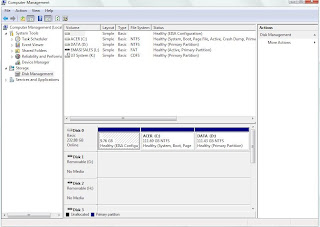
Then,right click on the disk you want to be resized and select 'shrink volume'.This will display information on the total disk space and shrinkable amount of space available on the drive.
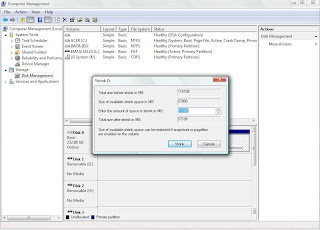
Then,type in the amout of size that you need to be shrunk then click 'Shrink'

Shrinking precess may take awhile.After the precess is completed,a new partition is created on the drive.

Note:Make sure that partitioning process is not interrupted by any way such as power failures.This will causes permanent damage to your disk and data.Make sure you have backup your important data and try this process at your own risk.

Sunday, November 16, 2008

Windows Live Writer Beta Review

The Windows Live Writer is a program that user can write their blog and save it in their pc or publish it to Windows Live Space,Blogger,etc.

In the beta program,there are some new function.User can change the font colour and the type of font their used.User also can set the post publish date,categories.Not just like this,user can preview the post live as in their blog or in HTML code.

Not just like this,user can edit their image in Windows Live Writer too.User can rotate the image without installing add-on anymore.There are more image borders to choose too.

These are the list that effect of image can be applied in Windows Live Writer Beta>
Transformation
  • Black and White
  • Sepia Tone
  • Adjust Temperature
  • Colour Pop
  • Sharpen
  • Gaussian Blur
  • Emboss
The following picture shows that the type of image borders can be applied>
Windows Live Writer is a good desktop blog-publishing program.Let us make full use of it^^