Some program will send some user private information through internet.If want to prevent this,user can use Zone Alarm .This software can prevent a program from connecting to the internet.
After you install,open it.
Click program control,then program.
You will see a list of program that prevented to connect to internet,at the bottom right got a "add" button you can browse the program you want.
Showing posts with label programs. Show all posts
Showing posts with label programs. Show all posts
Friday, December 4, 2009

Sunday, November 16, 2008
Minor Problem in Windows Live Writer Beta
You may experience long delays when you use Writer to publish to YouTube if your post:
- Contains a video intended for YouTube that is a duplicate of a video that’s already uploaded to YouTube.
- Uses a file format not supported by YouTube.
- Is determined by YouTube to be copyrighted material
Windows Live Writer Beta Review
 The Windows Live Writer is a program that user can write their blog and save it in their pc or publish it to Windows Live Space,Blogger,etc.
In the beta program,there are some new function.User can change the font colour and the type of font their used.User also can set the post publish date,categories.Not just like this,user can preview the post live as in their blog or in HTML code.
Not just like this,user can edit their image in Windows Live Writer too.User can rotate the image without installing add-on anymore.There are more image borders to choose too.
These are the list that effect of image can be applied in Windows Live Writer Beta>
Transformation
- Black and White
- Sepia Tone
- Adjust Temperature
- Colour Pop
- Sharpen
- Gaussian Blur
- Emboss
 Windows Live Writer is a good desktop blog-publishing program.Let us make full use of it^^
Saturday, November 1, 2008
Madotate,a 3D windows tool
Feelings that WindowsFlip3D not enough 3D,you can try Madotate.Madotate is a program that can makes 3D windows.
 You can use Madotate to change your windows looked like a box or other 3D shape.Madotate is supported from Win95 and so on.WinXP and so on gives the best result.To download Madotate,go to http://www.mydigitallife.info/2007/01/13/enable-3d-desktop-in-windows-xp-95-98-me-and-2000-with-madotate/
When you downloaded the file,extract it.You will see the file below.
 Just double click the madotate file and click run.Beside the minimize windows button will appear a new button.Just click the button then you can start enjoying 3D-ing windows.To exit,right click the madotate icon at the taskbar and then exit.
Enjoy^^
 You can use Madotate to change your windows looked like a box or other 3D shape.Madotate is supported from Win95 and so on.WinXP and so on gives the best result.To download Madotate,go to http://www.mydigitallife.info/2007/01/13/enable-3d-desktop-in-windows-xp-95-98-me-and-2000-with-madotate/
When you downloaded the file,extract it.You will see the file below.
 Just double click the madotate file and click run.Beside the minimize windows button will appear a new button.Just click the button then you can start enjoying 3D-ing windows.To exit,right click the madotate icon at the taskbar and then exit.
Enjoy^^
Friday, October 31, 2008
Windows Media Player 11 and how-to tips
Windows Media Player 11 is an application used to manage,hear,enjoy your music anytime.Media Player 11 is pre-installed at every Windows Vista OS.XP user can download it from http://www.microsoft.com/windows/windowsmedia/player/11/default.aspx
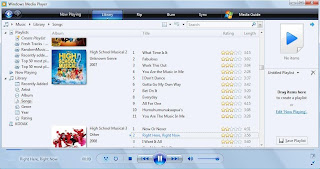 You can also apply various type or skin and visualizations to Windows Media Player,making your player nicer and prettier.Rip and burns song in Windows Media Player 11 also made easy.
To download skin>>http://www.microsoft.com/windows/windowsmedia/player/skins.aspx?locale=409&geoid=f4&version=11.0.6001.7000&userlocale=409
To download visualizations>>http://www.microsoft.com/windows/windowsmedia/player/visualizations.aspx?locale=409&geoid=f4&version=11.0.6001.7000&userlocale=409
There are some tips when using media player.
1) When adding album art please follow this steps (right click a song in your music library>advanced tag editor>pictures tab>add>find the file you want to add>hit ok).Please dun straight away paste the album art to the cd picture,this is because the resolution of the album art will be very low.If you have iTune and you are using the cover flow function,the album art will be very blur.
2)When you do not know about the song information you have,you can (right click the song in your music librarty>find album info).
3)You can change the way of the time display by clicking the time in media player.
4)When searching song at the search bar in media player,click the drop down button to filter the search result by artists or album.
Enjoy yourself with your media stuff with WMP11^^
 You can also apply various type or skin and visualizations to Windows Media Player,making your player nicer and prettier.Rip and burns song in Windows Media Player 11 also made easy.
To download skin>>http://www.microsoft.com/windows/windowsmedia/player/skins.aspx?locale=409&geoid=f4&version=11.0.6001.7000&userlocale=409
To download visualizations>>http://www.microsoft.com/windows/windowsmedia/player/visualizations.aspx?locale=409&geoid=f4&version=11.0.6001.7000&userlocale=409
There are some tips when using media player.
1) When adding album art please follow this steps (right click a song in your music library>advanced tag editor>pictures tab>add>find the file you want to add>hit ok).Please dun straight away paste the album art to the cd picture,this is because the resolution of the album art will be very low.If you have iTune and you are using the cover flow function,the album art will be very blur.
2)When you do not know about the song information you have,you can (right click the song in your music librarty>find album info).
3)You can change the way of the time display by clicking the time in media player.
4)When searching song at the search bar in media player,click the drop down button to filter the search result by artists or album.
Enjoy yourself with your media stuff with WMP11^^
Subscribe to:
Posts (Atom)